

 README

README


Features
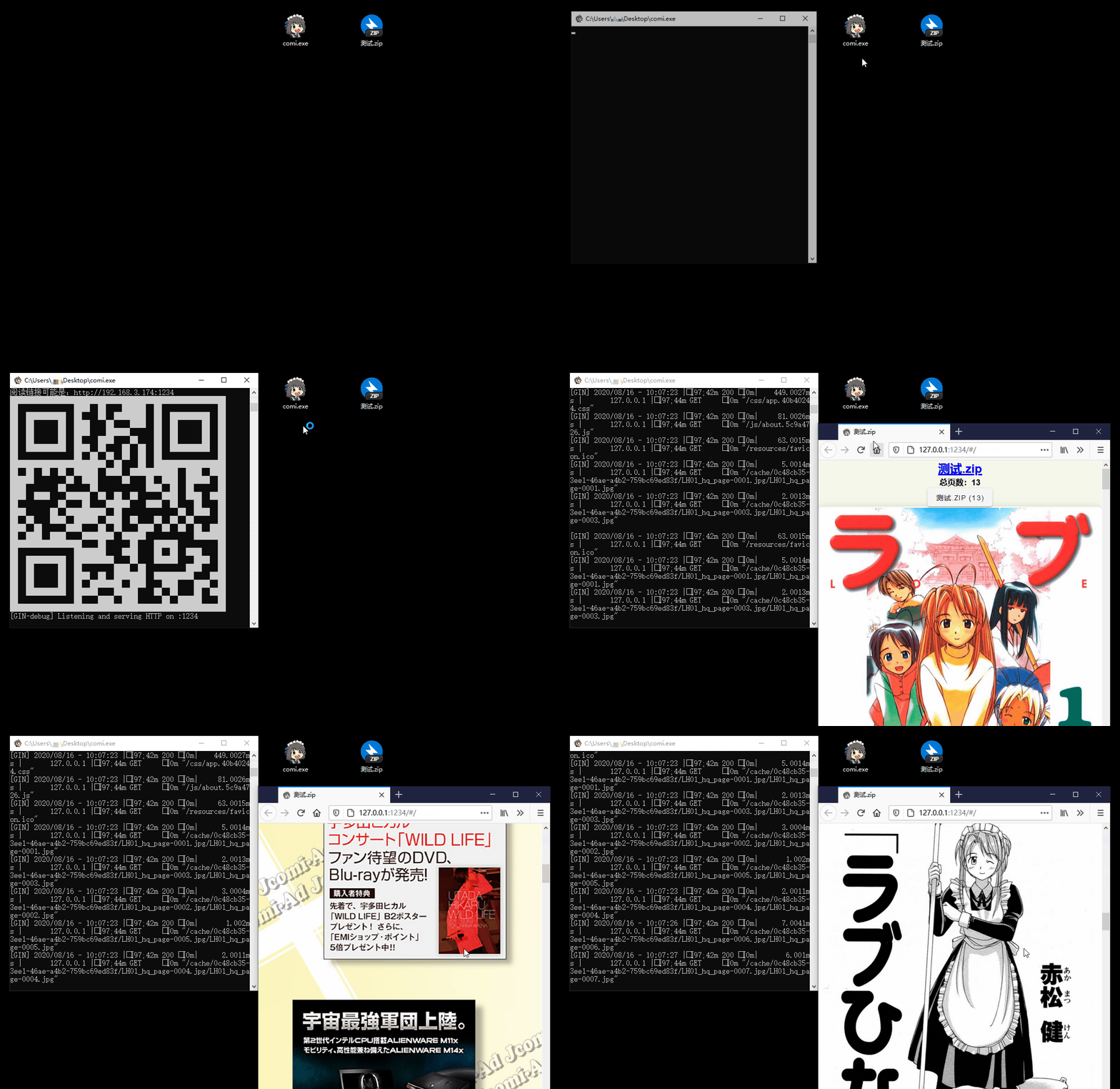
- 📚 Multiple Format Support: Supports image folders and compressed files like
.rar,.zip,.tar,.cbz,.cbr,.epub - 📱 Easy Access: QR code scanning for mobile/tablet devices, drag-and-drop support for Windows
- 🐧 Cross-Platform: Compatibility with Windows, Linux, and macOS
- 📖 Diverse Reading Modes: Offers scroll, and page-turning modes
- ⚙️ Flexible Configuration: Command-line operation with
config.tomllibrary settings - 🖼️ Modern Image Formats: In addition to
jpgandpng, it also supports next-gen formats likeheicandavif - ✂️ Smart Optimization: Automatic image cropping and compression for bandwidth saving
- 🔄 Sync Reading: Synchronized page-turning across different devices
- 🔌 Plugin System: Built-in plugins like auto page-turn and clock, with custom plugin support
- 🎬 Media Playback: Built-in audio and video player
- 📥 Flexible Download: Batch download image folders, convert and download as EPUB format
- 📜 Reading History: Automatic reading history tracking for easy continuation
Installation Guide
GUI Version (Recommended for Beginners)
| System | Download |
|---|---|
| Windows 64-bit | comigo_latest_Windows_x86_64_full.zip |
| macOS (Intel/Apple Silicon) | Comigo_latest.dmg |
💡 Note: GUI version provides system tray icon, can run minimized in background. Windows: Double-click to run; macOS: Drag to Applications folder.
Quick Install for CLI
# Recommended:
bash <(curl -s https://raw.githubusercontent.com/yumenaka/comigo/master/get.sh)

# For users in Mainland China:
bash <(curl -s https://comigo.xyz/get.sh) --cn

# If you have Golang (go 1.23 or higher):
go install github.com/yumenaka/comigo/cmd/comi@latest
CLI Version
| System | Download |
|---|---|
| Windows 64-bit | comi_latest_Windows_x86_64.zip |
| Windows ARM | comi_latest_Windows_arm64.zip |
| macOS Intel | comi_latest_MacOS_x86_64.tar.gz |
| macOS Apple Silicon | comi_latest_MacOS_arm64.tar.gz |
| Linux 64-bit | comi_latest_Linux_x86_64.tar.gz |
| Linux ARM64 | comi_latest_Linux_arm64.tar.gz |
| Linux ARM32 | comi_latest_Linux_armv7.tar.gz |
| Debian/Ubuntu 64-bit | comi_latest_amd64.deb |
| Debian/Ubuntu ARM64 | comi_latest_arm64.deb |
💡 Note: CLI version suitable for server deployment and advanced users. Manual PATH configuration required after download.
Manual Installation
Download the latest version from the Releases page and add the executable to your system's PATH environment variable.
Docker Deployment
Quick Start with Docker
# Pull and run the latest image
docker run -d \
  --name comigo \
  -p 1234:1234 \
  -v /path/to/your/books:/data \
  yumenaka/comigo:latest
Visit http://localhost:1234 to access your library.
Using Docker Compose
- Download the
docker-compose.ymlfile - Edit the configuration as needed
- Start the service:
docker-compose up -d
Supported Platforms
linux/amd64- Standard x86_64 serverslinux/arm64- ARM64 servers (Raspberry Pi 4/5)linux/arm/v7- ARMv7 devices (Raspberry Pi 2-4)
Environment Variables
| Variable | Description | Default |
|---|---|---|
COMIGO_PORT |
Service port | 1234 |
COMIGO_USERNAME |
Login username (optional) | - |
COMIGO_PASSWORD |
Login password (optional) | - |
COMIGO_ENABLE_UPLOAD |
Enable file upload | true |
For more details, see the complete Docker documentation.
Usage
comi [flags] file_or_dir
Command Line Options
| Option | Short | Default | Description |
|---|---|---|---|
--config |
-c |
- | Specify config file path |
--port |
-p |
1234 | Service port |
--host |
- | - | Custom hostname/domain |
--local |
- | false | Local access only |
--max-depth |
-m |
5 | Max scan depth |
--open-browser |
-o |
false | Open browser on start |
--enable-upload |
- | true | Enable file upload |
--read-only |
- | false | Read-only mode |
--username |
- | - | Login username |
--password |
- | - | Login password |
--debug |
- | false | Debug mode |
Examples
# Open current directory
comi .

# Specify port and path
comi -p 8080 /path/to/manga

# Local only with login protection
comi --local --username admin --password 123456 /path/to/manga
Configuration File
Comigo supports configuration file locations:
-
User Home Directory
- Windows:
C:\Users\username\.config\comigo.toml - Linux/MacOS:
/home/username/.config/comigo.toml - Default location read at startup
- Windows:
-
Program Directory
- Place
comigo.tomlin the same directory as the executable - Suitable for portable usage
- Place
-
Current Working Directory
- Searches for configuration file in the current directory when running commands
-
Custom Location
- Specify configuration file path using the
--configparameter
- Specify configuration file path using the
Feedback and Support
If you have any suggestions or encounter issues, feel free to:
Special Thanks
Thanks to the following open-source projects and their contributors:
- mholt
- spf13
- disintegration
- Baozisoftware
- And many more contributors
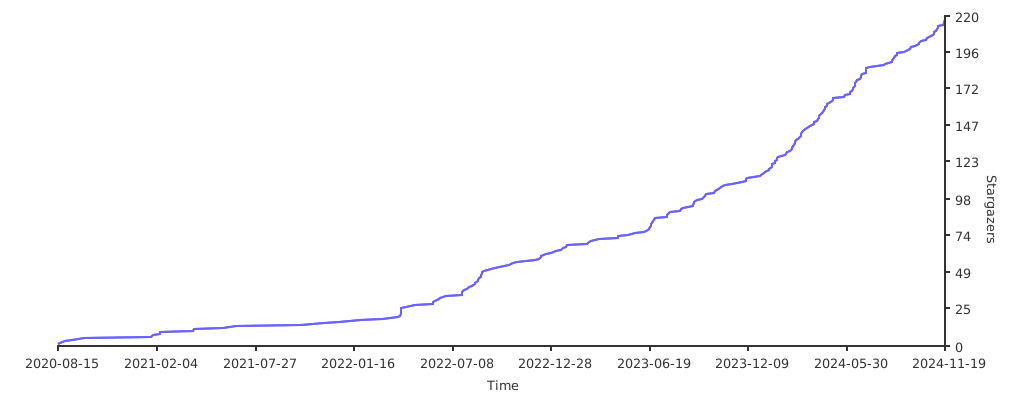
Project Statistics
License
This software is released under the MIT license.
 Documentation

Documentation


There is no documentation for this package.
 Source Files
 Directories

Directories

| Path | Synopsis |
|---|---|
|
comi
command
|
|
|
comigo
command
|
|
|
tui/comi
command
|
|
|
htmx
module
|
|
|
templ
|
|
|
common
templ: version: v0.3.977
|
templ: version: v0.3.977 |
|
common/svg
templ: version: v0.3.977
|
templ: version: v0.3.977 |
|
pages/error_page
templ: version: v0.3.977
|
templ: version: v0.3.977 |
|
pages/flip
templ: version: v0.3.977
|
templ: version: v0.3.977 |
|
pages/login_page
templ: version: v0.3.977
|
templ: version: v0.3.977 |
|
pages/player
templ: version: v0.3.977
|
templ: version: v0.3.977 |
|
pages/scroll
templ: version: v0.3.977
|
templ: version: v0.3.977 |
|
pages/settings
templ: version: v0.3.977
|
templ: version: v0.3.977 |
|
pages/shelf
templ: version: v0.3.977
|
templ: version: v0.3.977 |
|
pages/upload_page
templ: version: v0.3.977
|
templ: version: v0.3.977 |
|
plugins
templ: version: v0.3.977
|
templ: version: v0.3.977 |
|
vfs
Package vfs 提供虚拟文件系统抽象层,支持本地文件系统和远程存储(WebDAV、SFTP等)
|
Package vfs 提供虚拟文件系统抽象层,支持本地文件系统和远程存储(WebDAV、SFTP等) |